
What is a gaming setup in 2026?
In 2026, a gaming setup is a coordinated combination of PC, monitor, peripherals, furniture, audio gear and accessories that lets you play comfortably. The thinking has changed: players now want a capable, comfortable and lasting space, rather than a random collection of products.
Balance is the key. The graphics card remains the most important component for gaming performance, but the CPU, RAM, SSD, power supply and cooling also need to work well together to avoid bottlenecks. Likewise, 1080p, 1440p and 4K demand very different levels of hardware.
The essential parts of a complete gaming setup
To build a solid gaming setup, think in terms of components that serve different purposes. Neglecting any one of them hurts the overall experience, even if the rest of your gear is excellent.
The core: the PC
It determines smoothness, detail settings, stable frame rates and whether you can run recent games at 1080p, 1440p or 4K.
The display: the monitor
Resolution, refresh rate, response time and panel type directly change how games feel.
The controls: keyboard and mouse
They affect precision, responsiveness and comfort, especially in FPS, MMO and competitive games.
The audio: headset or speakers
Good sound improves immersion, spatial awareness and in-game communication.
The voice: microphone
Essential for multiplayer, Discord, streaming or cleaner recordings than an average headset microphone can provide.
The environment: desk, chair and lighting
Physical comfort and an easy-to-use space have become just as important as raw computing power.
Choose the right gaming PC for how you play
In 2026, the GPU still has the greatest influence on gaming performance, while a modern six- to eight-core CPU is a sensible starting point for most players. 16 GB of RAM remains enough for a 1080p-focused setup, while 32 GB becomes particularly useful if you want a PC that lasts, comfortable 1440p gaming or a mix of gaming and streaming.
| Player profile | Recommended CPU | Recommended GPU | RAM | Storage | Target |
|---|---|---|---|---|---|
| Beginner / budget | Ryzen 5 5600, 7500F or Core i5-12400F | RTX 5060, RX 9060 XT | 16 GB | 1 TB NVMe SSD | 1080p, esports and AAA games with optimized settings |
| Versatile gamer | Ryzen 5 9600X, Ryzen 7 7800X3D, Core i5-14600KF | RTX 5060 Ti, RTX 5070, RX 9070 | 16 to 32 GB | 1 to 2 TB NVMe SSD | Smooth 1440p gaming and excellent all-round comfort |
| High-end / streaming | Ryzen 7 9800X3D, Ryzen 9 9950X3D, Core Ultra 7/9 | RTX 5070 Ti to RTX 5090 | 32 GB | At least 2 TB SSD | 1440p ultra or 4K, content creation and streaming |
Which gaming monitor should you choose in 2026?
The monitor is often underrated, even though it immediately transforms the gaming experience. A great PC connected to a poor monitor makes for an unbalanced setup. Conversely, a monitor suited to your machine lets you appreciate its performance.
For competitive gaming
Choose a 24- or 25-inch 1080p monitor with a high refresh rate. This format remains excellent for fast-paced shooters and directs your budget toward smooth gameplay.
For the best balance
A 27-inch 1440p monitor is the sweet spot today. It offers a sharper picture, a more comfortable workspace and greater versatility for both solo and competitive games.
For immersion
Large screens, ultrawide monitors and some OLED models are appealing for single-player games, simulation and media, but require a more powerful PC.
To avoid disappointment
Never choose a monitor solely by its refresh rate. Check the resolution, panel quality, contrast, variable refresh rate support and what you actually use it for.
Keyboard, mouse, headset and microphone: what really matters
The details often make or break a complete gaming setup. A keyboard that is too loud, a mouse that does not suit your grip or an uncomfortable headset can spoil hours of gaming, even with an excellent PC.
The gaming keyboard
The best keyboard is not necessarily the most expensive. Consider its size, typing feel, stability, ergonomics and layout. For beginners, a simple, reliable, well-built model is often better than a keyboard packed with features you will rarely use. See our picks in the best gaming keyboards for beginners guide.

SteelSeries Apex Pro TKL Gen 3
The fastest gaming keyboard in the world in 2026. Its OmniPoint 3.0 HyperMagnetic switches offer adjustable actuation from 0.1 to 4 mm, Rapid Trigger, Rapid Tap, a built-in OLED screen and a premium aluminum frame. A benchmark for competitive esports with a French AZERTY layout.
The gaming mouse
Weight, shape, sensor and click quality matter more than marketing. A light, accurate mouse can make a real difference in comfort. If your budget is tight, highly capable mice are now available at low prices. Read our comparison of the best affordable gaming mice.

Razer DeathAdder V3 HyperSpeed
An ultralight wireless gaming mouse built for esports. It weighs just 55 g, offers 100 hours of battery life and uses Gen 3 optical switches for maximum responsiveness with every click.
The gaming headset
Wireless gaming headsets have improved considerably in 2026, offering genuine comfort and freedom of movement. Pay attention to battery life, comfort during long sessions, microphone quality and sound reproduction. Our comparison of the best wireless gaming headsets in 2026 will help you choose.

SteelSeries Arctis Nova Pro Wireless
The most complete wireless gaming headset on the market in 2026. It has two hot-swappable batteries, a high-fidelity audio DAC, a retractable microphone and active noise cancellation. Ideal comfort for long sessions.
The USB microphone
If you stream, play in a squad or record content, a dedicated USB microphone makes a clear difference to how your voice sounds. If clear communication is your priority, it is often a better investment than a premium all-in-one headset. Discover the best USB microphone for streaming.
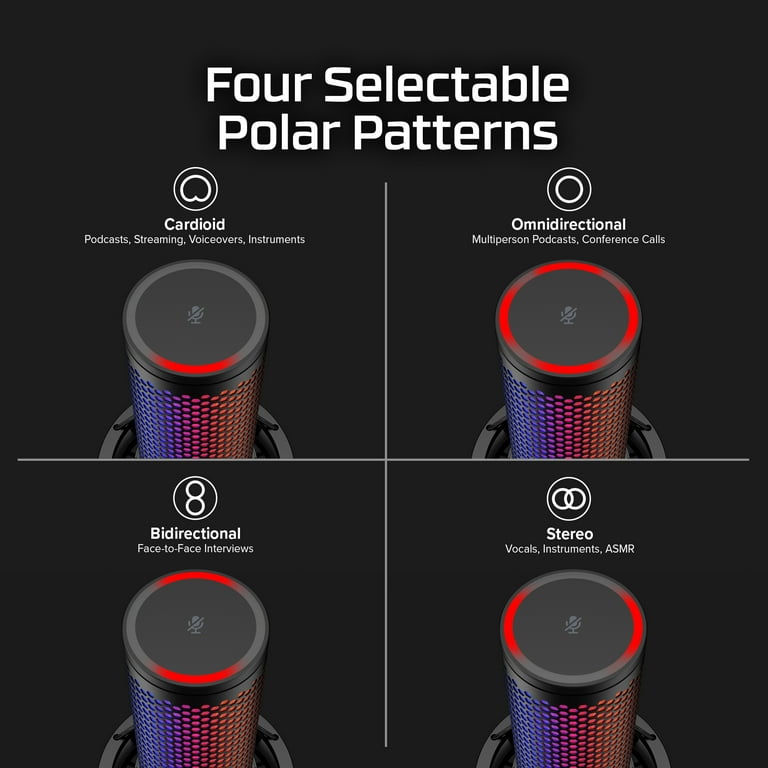
HyperX QuadCast 2 S
One of the most versatile gaming USB microphones available. It offers studio-quality 32-bit / 192 kHz recording, four selectable pickup patterns, over 100 customizable aRGB LEDs and a built-in tap-to-mute sensor. Plug & play, with no complicated setup.
Desk, chair, lighting and ergonomics
A gaming setup in 2026 is also a digital living space. Many players spend as much time there watching content, working or streaming as they do gaming. Furniture and ergonomics are therefore essential.
The desk
Choose a desk deep enough to keep a comfortable distance from the screen and leave room for your keyboard and mouse. A surface that is too narrow makes the setup tiring to use and visually cluttered.
The chair
Judge comfort by the seat, lumbar support, adjustments and how it feels over time, rather than its racing look. A good ergonomic chair is often a better choice than a flashy gaming chair.
The lighting
Well-planned lighting improves visual comfort. Ideally, combine soft ambient light, task lighting and perhaps a restrained decorative accent.
Cable management
A tidy setup looks more polished and works better. Cable ties, channels, monitor arms and well-placed power strips can make a huge difference at very little cost. See the best useful Amazon accessories for improving your setup.
How much should you budget for a gaming setup in 2026?
Your budget will vary considerably with your expectations. You can build a first gaming setup for around €500 to play esports or less demanding games at 1080p, though compromises are necessary. Add a good monitor, capable peripherals and real everyday comfort, and the total rises quickly.
| Budget | What you can aim for | Main compromises |
|---|---|---|
| Under €500 | Entry-level setup for esports, used components or an upgradeable foundation | Compromises on recent AAA games, the monitor and accessories |
| €700 to €1,200 | Very good 1080p setup, sometimes 1440p depending on the configuration | Choices to make between the PC and peripherals |
| €1,200 to €2,000 | A well-balanced setup for serious gaming over the long term | Few compromises and an excellent long-term foundation |
| €2,000 and above | Premium setup for 1440p ultra, 4K, streaming and refined aesthetics | Diminishing returns if your needs are modest |
Mistakes you should absolutely avoid
- Buying for looks before checking actual performance.
- Choosing a monitor too demanding for your PC to drive properly.
- Spending too much on RGB and too little on the power supply or cooling.
- Neglecting your chair, desk and posture.
- Choosing peripherals based on marketing claims rather than how you use them.
- Ignoring upgrade options when a gaming setup rarely stays the same forever.
- Copying an influencer's setup without considering your own budget.
How to upgrade your setup without replacing everything
A good gaming setup is often built in stages. Start with the three foundations: PC, monitor and desk. Then improve the areas that make a real difference to your daily experience.
- Secure baseline performance with a balanced PC.
- Choose a monitor suited to your target resolution.
- Improve your posture and physical comfort.
- Upgrade the peripherals you use most.
- Finish with accessories, decoration and visual refinements.
Gaming setup FAQ 2026
What is the best gaming setup in 2026?
The best gaming setup is the one that suits your games, target monitor and budget. For many players, a balanced 1440p setup now offers the best combination of visual quality, smooth performance and longevity.
Can you build a cheap gaming setup?
Yes, especially for esports and 1080p gaming. Configurations around €500 still exist, with compromises on the most demanding games, the finish or immediate upgrade options.
Do you need 32 GB of RAM in 2026?
16 GB remains viable for many budget gaming setups. However, 32 GB is increasingly useful if you want your PC to last longer, multitask comfortably or combine gaming, streaming and content creation.
Which component matters most in a gaming setup?
For gaming performance, the graphics card remains central. But it is not enough on its own: a good CPU, fast SSD, reliable power supply and good monitor are all essential for a balanced setup.
Further reading
- Best wireless gaming headsets 2026: the ultimate comparison
- Best affordable gaming mice: performance without overspending
- Best gaming keyboards for beginners: our picks
- Best USB microphones for streaming: studio quality at home
- Best gaming setup under €500: is it possible?
- Useful Amazon accessories for gamers: improve your setup